
If you’ve ever left your phone on a desk and walked into another room while listening to music, you’ve probably wondered: how many feet can AirPods reach?
The answer depends on several factors, including the AirPods model, Bluetooth technology, obstacles between the earbuds and your device, and environmental interference. In ideal conditions, most AirPods can maintain a connection at distances far greater than many users expect.
Understanding the actual Bluetooth range of AirPods can help you avoid connection issues, improve listening experiences, and get the most out of your wireless earbuds.
Let’s explore the real-world range of AirPods and what affects their performance.
Quick Answer: AirPods Bluetooth Range
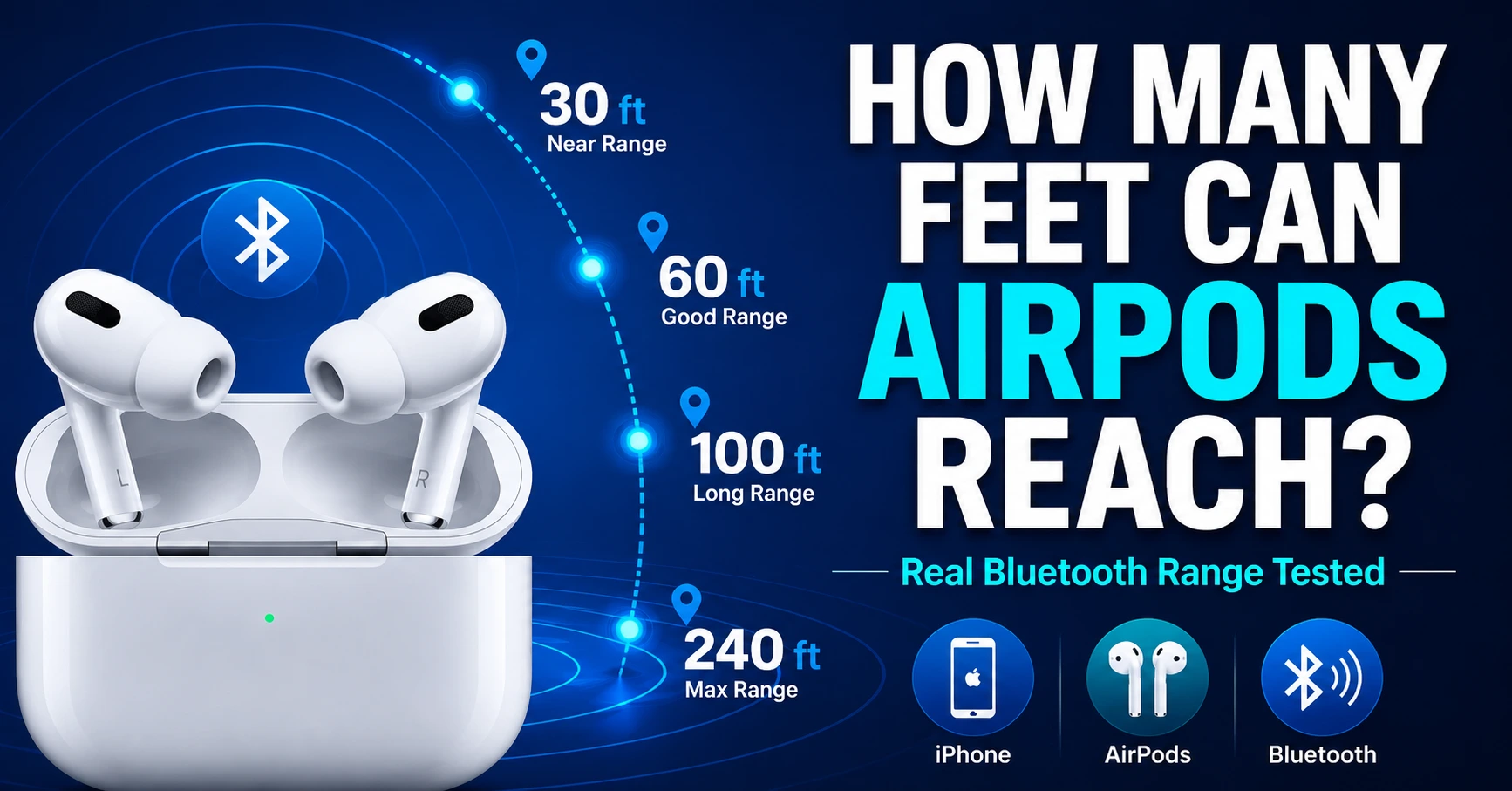
In general, AirPods can reach approximately:
| Environment | Typical Range |
|---|---|
| Indoor home or office | 30–60 feet |
| Open outdoor area | 100–240 feet |
| Ideal line-of-sight conditions | Up to 240 feet or more |
Most users experience reliable performance within 30 to 60 feet indoors, while open outdoor environments often allow significantly greater distances.
The exact range depends on the AirPods generation and the device they are connected to.
Understanding How AirPods Connect
Before discussing distance, it helps to understand how AirPods communicate with your device.
Bluetooth Technology Explained
AirPods use Bluetooth wireless technology to transmit audio from your iPhone, iPad, Mac, or other compatible devices.
Bluetooth creates a short-range wireless connection that allows:
- Audio streaming
- Voice calls
- Siri access
- Device synchronization
Newer AirPods models use advanced Bluetooth chips that improve connection stability and power efficiency.
Why Range Varies
Bluetooth range is not a fixed number.
Many conditions influence performance, including:
- Physical barriers
- Signal interference
- Device hardware
- Weather conditions
- Network congestion
As a result, two users may experience different ranges even with identical AirPods.
How Many Feet Can AirPods Reach in Real Life?
Manufacturer specifications often describe ideal conditions. Real-world performance is usually different.
Indoors
Inside homes and offices, walls, furniture, and electronics weaken Bluetooth signals.
Typical indoor range:
- 30–60 feet
- One or two rooms away
- Sometimes farther in open floor plans
If you move behind multiple walls, audio may begin to stutter or disconnect.
Outdoors
Outdoor environments typically provide fewer obstacles.
Expected range outdoors:
- 100–240 feet
- Stronger signal stability
- Better audio quality at longer distances
Many users report walking across large yards, parks, or sports fields while maintaining a stable connection.
Open Areas
Large open spaces offer the best conditions.
Examples include:
- Empty warehouses
- Gymnasiums
- Athletic fields
- Parking lots
Under these conditions, AirPods can sometimes exceed 200 feet before losing connection.
AirPods Range by Model
Different AirPods generations use improved wireless technology.
AirPods 1st & 2nd Generation
Typical range:
- Indoors: 30–50 feet
- Outdoors: 100–150 feet
These models offer solid connectivity but lack some improvements found in newer versions.
AirPods 3rd Generation
Typical range:
- Indoors: 40–60 feet
- Outdoors: 150–200 feet
Improved wireless performance often results in fewer dropouts.
AirPods Pro
AirPods Pro deliver strong Bluetooth reliability thanks to enhanced hardware.
Expected range:
- Indoors: 40–60 feet
- Outdoors: 150–200 feet
Active Noise Cancellation does not significantly affect Bluetooth range.
AirPods Pro 2
The second-generation AirPods Pro feature Apple’s newer wireless technology.
Expected range:
- Indoors: 50–70 feet
- Outdoors: 200–240 feet
Many users report noticeably stronger connectivity.
AirPods Max
Despite their larger size, AirPods Max offer similar Bluetooth performance.
Expected range:
- Indoors: 40–70 feet
- Outdoors: 200+ feet
Factors That Affect AirPods Range
Several factors determine whether your AirPods maintain a stable connection.
Walls and Obstacles
Physical barriers absorb wireless signals.
Common obstacles include:
- Concrete walls
- Brick walls
- Metal structures
- Elevators
- Thick furniture
The more obstacles between your AirPods and device, the weaker the signal becomes.
Wireless Interference
Many household devices use frequencies similar to Bluetooth.
Examples include:
- Wi-Fi routers
- Smart TVs
- Wireless speakers
- Baby monitors
- Microwaves
Heavy interference can shorten effective range.
Battery Levels
Low battery power may impact overall performance.
Keeping both AirPods and the connected device charged helps maintain stable connectivity.
Device Compatibility
Newer Apple devices often provide better wireless performance.
For example:
- Recent iPhones
- Newer iPads
- Updated MacBooks
Older hardware may not deliver the same connection quality.
AirPods Range Comparison Table
| AirPods Model | Indoor Range | Outdoor Range |
|---|---|---|
| AirPods 1st Gen | 30–50 ft | 100–150 ft |
| AirPods 2nd Gen | 30–50 ft | 100–150 ft |
| AirPods 3rd Gen | 40–60 ft | 150–200 ft |
| AirPods Pro | 40–60 ft | 150–200 ft |
| AirPods Pro 2 | 50–70 ft | 200–240 ft |
| AirPods Max | 40–70 ft | 200+ ft |
These figures represent average real-world experiences and can vary based on conditions.
How to Improve AirPods Bluetooth Range
If your AirPods disconnect too easily, several simple adjustments can help.
Keep Software Updated
Apple regularly releases firmware and software updates.
Updates often improve:
- Connection stability
- Audio quality
- Bluetooth performance
Always keep your devices updated.
Reduce Interference
Try moving away from:
- Crowded Wi-Fi environments
- Large electronics
- Industrial equipment
Less interference generally means a stronger signal.
Maintain Battery Health
Recharge AirPods before batteries become critically low.
Healthy batteries contribute to consistent performance.
Keep Devices Visible
Bluetooth performs best when there is a direct line of sight.
Avoid placing your phone:
- Inside metal cabinets
- Behind thick walls
- Under heavy furniture
Common AirPods Range Problems and Solutions
Many users believe their AirPods are defective when range decreases.
Common issues include:
| Problem | Possible Cause | Solution |
|---|---|---|
| Audio cuts out | Too many obstacles | Move closer |
| Frequent disconnects | Bluetooth interference | Change location |
| One AirPod disconnects | Low battery | Recharge earbuds |
| Poor range outdoors | Device issue | Restart Bluetooth |
| Signal drops suddenly | Software bug | Update firmware |
Most connectivity problems can be resolved without replacing the AirPods.
Can AirPods Work Through Walls?
Yes, AirPods can work through walls.
However, each wall reduces signal strength.
Typical examples:
- One drywall wall: usually no problem
- Two walls: possible minor interruptions
- Three or more walls: increased risk of dropouts
- Concrete or brick walls: significant signal reduction
If you move too far behind obstacles, the connection will eventually break.
AirPods vs Other Wireless Earbuds Range
Many people wonder whether AirPods offer better range than competing earbuds.
| Earbud Type | Typical Range |
|---|---|
| AirPods | 100–240 ft |
| Samsung Galaxy Buds | 100–200 ft |
| Sony WF Series | 100–200 ft |
| Jabra Elite Series | 100–200 ft |
| Google Pixel Buds | 100–180 ft |
AirPods generally rank among the best wireless earbuds for connectivity, especially when paired with Apple devices.
The integration between Apple’s hardware and software often improves reliability.
Expert Tips for Better AirPods Performance
To maximize range and audio quality:
- Keep Bluetooth enabled only on active devices.
- Restart AirPods occasionally.
- Avoid placing your phone in enclosed metal objects.
- Update iOS and AirPods firmware regularly.
- Use AirPods with newer Apple devices when possible.
- Store AirPods properly to maintain battery health.
- Minimize interference from multiple wireless devices.
These small habits can significantly improve daily performance.
Frequently Asked Questions
1. How many feet can AirPods reach from an iPhone?
Most AirPods can reliably reach 30–60 feet indoors and up to 240 feet outdoors under ideal conditions.
2. Can AirPods work 100 feet away?
Yes. In open environments with minimal interference, AirPods can often maintain a stable connection at 100 feet.
3. Do AirPods Pro have a longer range than regular AirPods?
Generally, AirPods Pro and AirPods Pro 2 provide improved connectivity and often achieve greater real-world range.
4. Does Wi-Fi affect AirPods range?
Yes. Heavy Wi-Fi traffic and other wireless devices can create interference that reduces Bluetooth performance.
5. Why do my AirPods disconnect when I move to another room?
Walls, furniture, and electronic interference weaken Bluetooth signals, causing dropouts when distance increases.
Conclusion
So, how many feet can AirPods reach? In most situations, AirPods provide a reliable Bluetooth connection between 30 and 60 feet indoors and can extend to 100–240 feet outdoors when conditions are ideal.
The actual range depends on your AirPods model, surrounding obstacles, wireless interference, and the device you’re connected to. Newer models such as AirPods Pro 2 typically offer the best connectivity and longest range.
For the best experience, keep your devices updated, minimize interference, and maintain a clear path between your AirPods and your phone. By following these simple tips, you can enjoy stable audio performance and make the most of your wireless earbuds wherever you go.
discover more